Kate Kim
Every modern-day social media marketer has probably experienced the struggle of not being able to add a track as the finishing touch when scheduling Instagram content. Instead, they publish the post, jump into the app, tap Edit, find the track, and save. Then they do it again for the next one. And the one after that.
Nobody really talked about this step because it felt too small to complain about. But it built inconsistency across teams, made it easy to forget on a busy day, and quietly affected reach in ways most people didn't realize.
Zavy has changed that. We're excited to announce that Instagram music will soon be available directly inside Zavy’s social media publishing calendar.
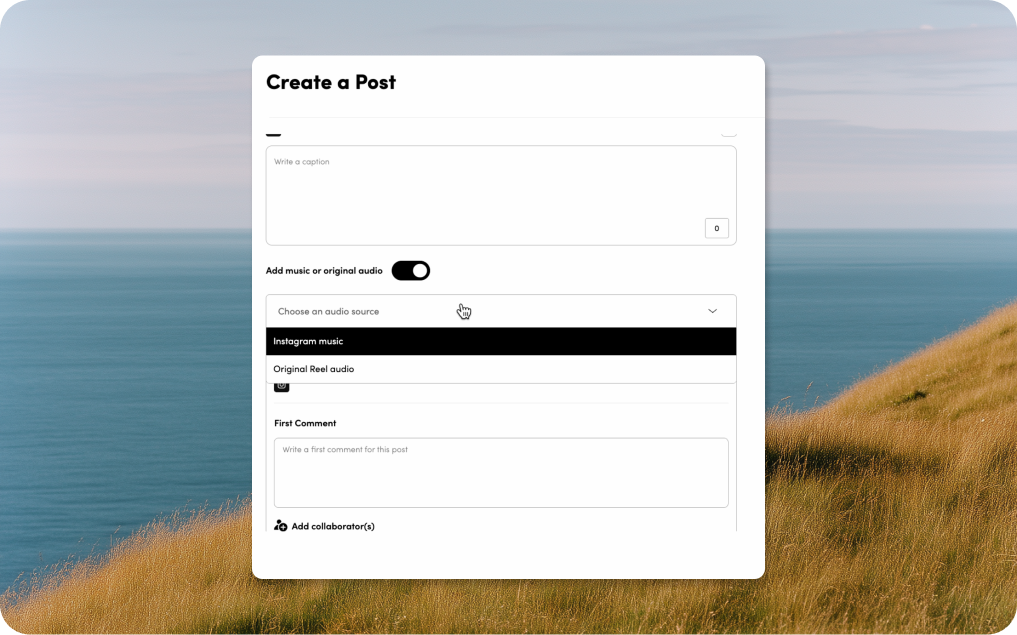
When scheduling Instagram content in Zavy, you’ll see a new toggle: “Add music or original audio.” Switch it on and a dropdown gives you two options: Instagram music or Original Reel audio.
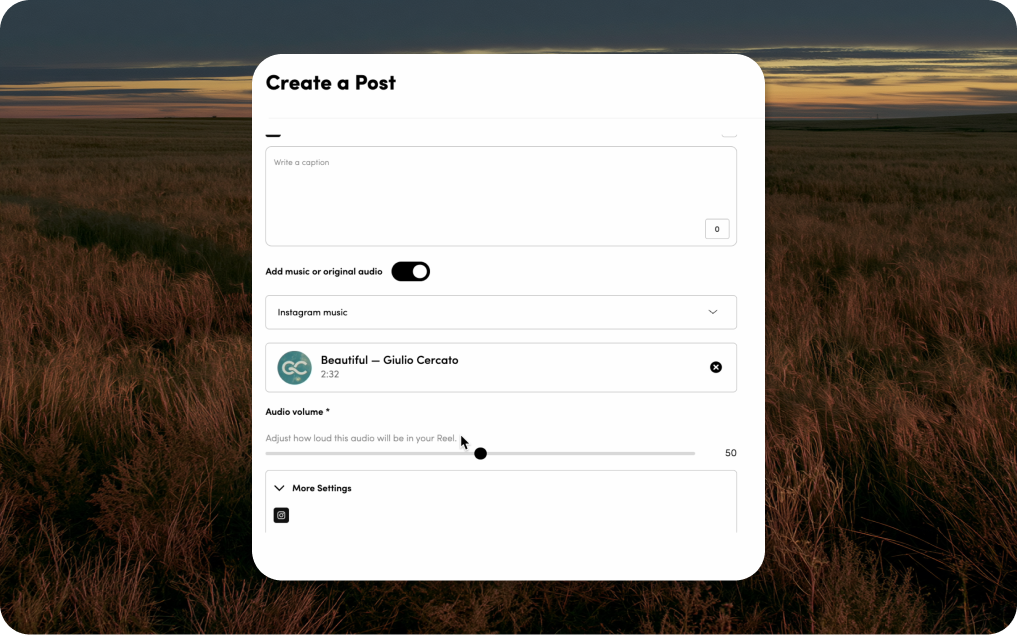
From there, a search bar will open against Instagram’s actual library with the same tracks you’d find in the native app. Type in a song or artist and results appear in real time with the track name and duration. Select one and it locks in.
An audio volume slider then lets you set how loud the track plays in the post, on a scale of 0 to 100. If your video has voiceover or product audio, dial it down. If the music is carrying the post, leave it where it is.
When the content goes live, the music tag is there. Native attribution, same as if you’d added it from the app. You don’t have to go back in when it publishes.
That manual edit can snowball into not just an inconvenience but also affects how the post performs. Instagram’s early engagement window is the period right after a post goes live when the algorithm decides how broadly to push it. An IG carousel that publishes without a music tag and gets one added 20 minutes later has already passed through part of that window without the full classification signal.
In addition to maximizing the algorithm push, Instagram surfaces Reels with music through the track’s discovery feed, in Explore, and to users who’ve engaged with that song before. So, the earlier the tag is there, the more it counts. Setting the music in the scheduling platform means the Reel goes out complete, every time, without anyone having to remember.
If you're already using Zavy for Instagram, the music toggle is just there in the platform, next to your caption, hashtags, and scheduling time. There’s no extra button or tab you need to open.
For most accounts, the actual change is small. Instead of scheduling the content and then opening Instagram to add a track, you pick it before you schedule. That's simply the whole process.
If you’re planning on batch-scheduling, it's worth picking music in the same session you're writing captions. Trending tracks move fast and choosing reactively after publishing means you're usually a step behind. The search bar pulls from Instagram's live library, so what you see there is current and updated.
For teams managing multiple accounts, the music setting is per post. Each post gets its own track and volume level, which means you can actually match the music to what's in the video rather than applying one setting across the board.
If you found this post because you were looking for a way to add music to scheduled content and haven't used Zavy before, here’s some quick context of what we offer:
Zavy is a social media management platform for brand and marketing teams. Scheduling across Instagram, Facebook, X, TikTok, and more from one calendar, with multi-account support, shared drafts, and approval workflows. The standard stuff.
What it also has -- and what most schedulers don't -- is deep insights including benchmarking, competitor tracking, sentiment data, reporting you don't have to build yourself. The music integration is new, but it sits inside on the same platform. Not a standalone tool.
If you want to see how it works before committing to anything, we can walk you through it in a demo. Takes about 30 minutes.


.avif)